
O_DIRECT 功能验证使用
参考链接
https://www.kernel.org/doc/html/next/filesystems/fscrypt.html https://blog.csdn.net/qq_39952971/article/details/116228285 https://redmine.rock-chips.com/issues/598372 https://source.android.com/docs/security/features/encryption/adiantum?hl=zh-cn https://source.android.com/docs/security/features/encryption/file-based?hl=zh-cn
核心概念
O_DIRECT 是一个在打开文件时使用的标志(与 O_RDONLY、O_WRONLY、O_RDWR 等一起使用)。它的核心目标是绕过操作系统内核的页缓存,让数据直接在用户空间缓冲区和磁盘(或块设备)之间传输。
工作原理对比
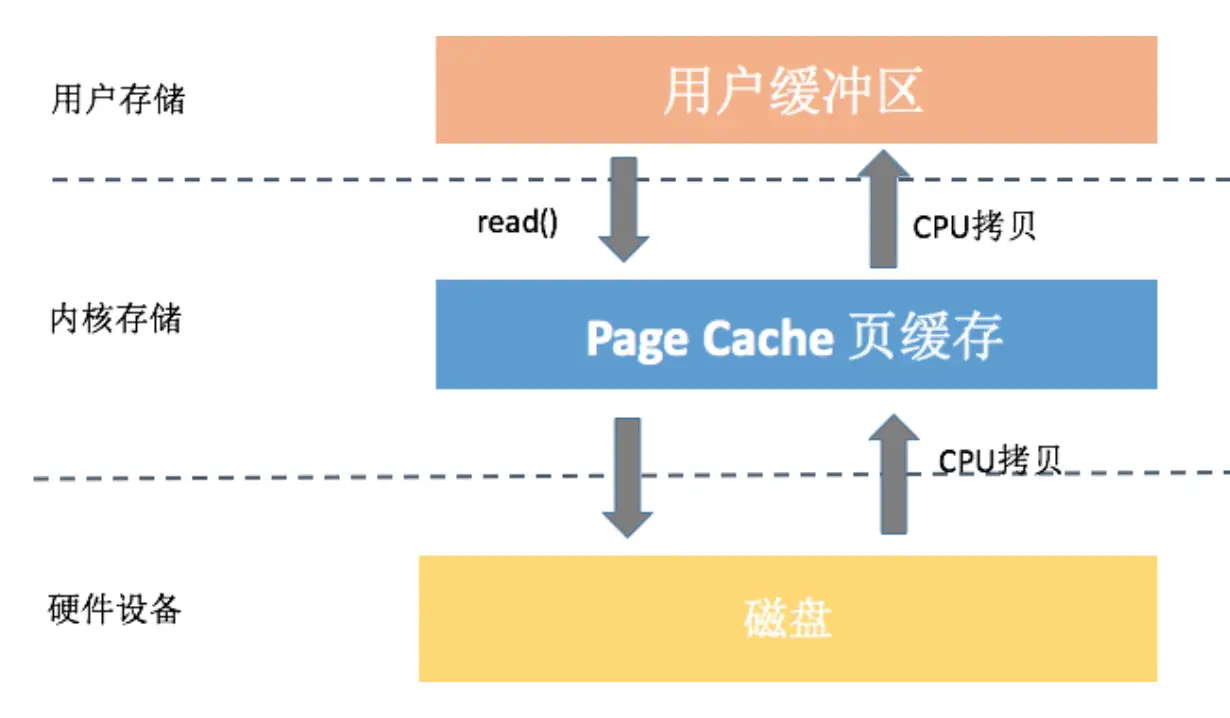
为了理解 O_DIRECT,先看看普通 I/O 的流程:
1. 标准 I/O(使用 Page Cache)
- 写操作: 数据从用户缓冲区 -> 内核页缓存 -> 标记为“脏页” -> 由内核在合适时机异步写回磁盘。
- 读操作: 内核先检查页缓存是否有数据,若有(缓存命中)则直接返回;若无(缓存未命中)则从磁盘读入页缓存,再拷贝到用户缓冲区。
- 优点: 利用了缓存,对重复读和少量写非常高效;减少了实际磁盘操作。
- 缺点: 数据需要多次拷贝(用户态<->内核态);占用系统内存作为缓存;数据写入的时机由内核控制,应用无法精确掌握。
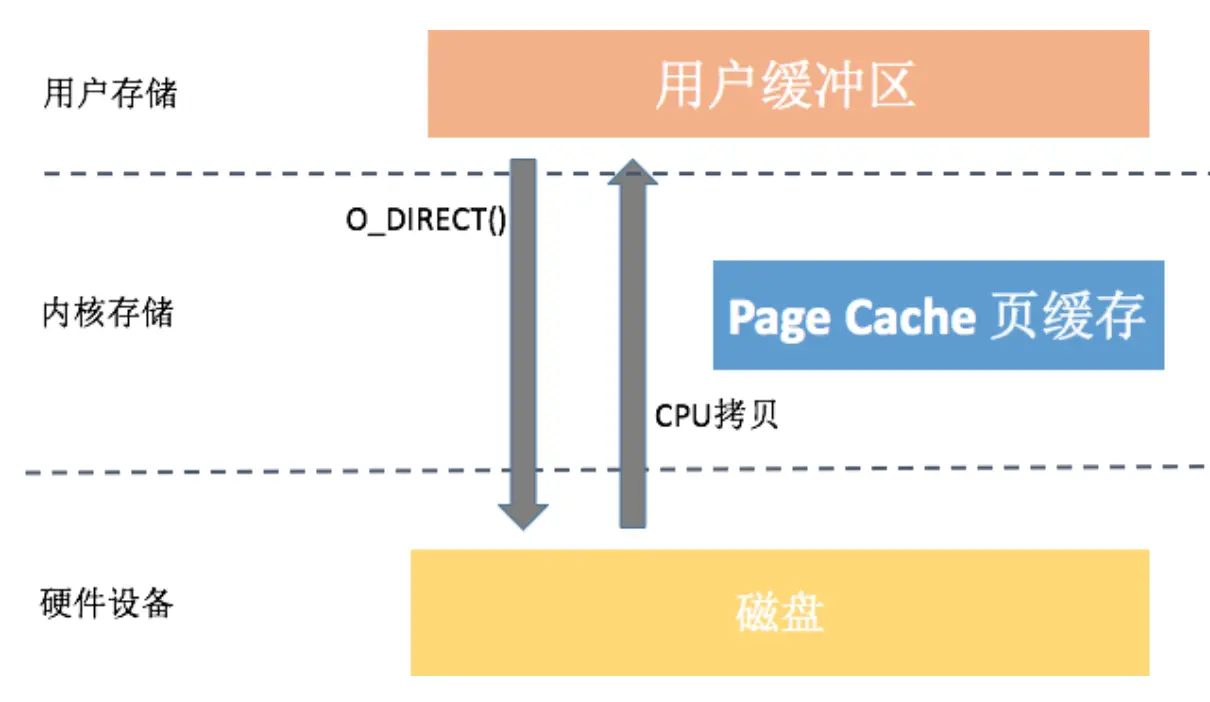
2. 使用 O_DIRECT 的 I/O
- 写操作: 数据直接从用户缓冲区通过 DMA 等方式传输到磁盘。
- 读操作: 数据直接从磁盘传输到用户缓冲区。
- 关键变化: 跳过了页缓存这个“中间商”。数据不进入系统内存的缓存区,减少了拷贝次数和 CPU 开销。
核心特性与要求
O_DIRECT 的使用有严格限制,这是其设计使然:
-
对齐要求: 这是最容易出错的地方。必须满足:
- 内存对齐: 用于传递数据的用户空间缓冲区地址,必须是内存页大小(通常 4096 字节)的整数倍。通常使用
posix_memalign或aligned_alloc来分配内存。 - 文件偏移对齐: 读写的起始位置在文件中必须是物理磁盘扇区大小(通常 512 字节)的整数倍。
- 长度对齐: 读写的字节数也必须是扇区大小的整数倍。
- 不满足对齐要求的
O_DIRECT操作会失败(返回-1,errno被设为EINVAL)或导致性能严重下降和静默回退到缓存 I/O。
- 内存对齐: 用于传递数据的用户空间缓冲区地址,必须是内存页大小(通常 4096 字节)的整数倍。通常使用
-
对缓存的影响: 使用
O_DIRECT读写的数据不会污染系统的页缓存。这对于一次性读取大文件(如视频处理)非常有用,不会挤掉重要的热数据缓存。 -
与
O_SYNC的区别:O_DIRECT关乎 “数据在哪里中转”(绕过缓存)。O_SYNC关乎 “数据何时落盘”(确保数据及元数据写入物理存储后才返回)。- 两者可以组合使用(
O_DIRECT | O_SYNC),表示“数据不经过缓存,并且必须立刻写入磁盘”。这通常非常慢,但能提供最强的持久性保证。
优点
- 减少拷贝次数: 消除用户缓冲区与内核缓存之间的拷贝,降低 CPU 占用。
- 避免缓存污染: 不适合缓存的大数据量操作(如数据库载入、媒体文件处理)不会挤占宝贵的内存缓存。
- 更可控的 I/O 行为: 应用自己管理缓存策略(如数据库有自己的精巧缓存 B+Tree),可以比通用内核缓存更高效。
- 降低内存占用: 数据不重复占用用户空间和内核缓存两份内存。
缺点与挑战
- 对齐要求苛刻: 增加了编程复杂性。
- 失去缓存优势: 对小数据量、重复读的操作,性能会远差于缓存 I/O。
- 异步优势减弱: 内核的“回写”机制是异步的,
O_DIRECT的写操作通常需要等待物理 I/O 完成,延迟更高。 - 内核优化失效: 无法享受内核的预读、合并写请求等优化。
Android 简单的验证方式
Ubuntu PC 上
vim test_o_direct.c
// test_o_direct.c
#include <stdio.h>
#include <string.h>  // 添加这个头文件
#include <sys/types.h>
#include <sys/stat.h>
#define __USE_GNU 1
#include <fcntl.h>
#include <errno.h>
#include <unistd.h>
#include <stdlib.h>

int main() {
    // 先创建文件
    int fd = open("./test.dat", O_RDWR|O_CREAT, 0644);
    if (fd < 0) {
        printf("Create file failed: errno=%d\n", errno);
        return -1;
    }
    close(fd);

    // 测试 O_DIRECT
    fd = open("./test.dat", O_RDWR|O_DIRECT);
    printf("Open with O_DIRECT: fd=%d, errno=%d\n", fd, errno);

    if (fd >= 0) {
        close(fd);
        printf("✓ Device supports O_DIRECT\n");
    } else if (errno == 22) {  // 或者使用 EINVAL
        printf("✗ Device does NOT support O_DIRECT (EINVAL)\n");
    } else {
        printf("? Other error: %d - %s\n", errno, strerror(errno));
    }

    // 清理
    unlink("./test.dat");
    return 0;
}
使用交叉编译链编译
aarch64-linux-gnu-gcc -static -o test_o_direct test_o_direct.c
推送到 Android arm 板测试
# 推送可执行文件
adb push test_o_direct /data/local/tmp/
adb shell chmod 755 /data/local/tmp/test_o_direct

# 执行测试
adb shell "cd /data/local/tmp && ./test_o_direct"
需要使用/data/local/tmp/这个目录
RK3568/3588 支持 O_DIRECT
询问 fae 得知,有客户在 3588 Android13 上做过 O_DIRECT,但是该修改在 Android11 上并未尝试过,具体为: 在 fstab 里面添加 inlinecrypt 属性
wlq@sys2206:~/d1_Android16_all/device/rockchip/common$ git show cab3f348cc3229098cedc6ca7ec87fa7b1ccd64e
commit cab3f348cc3229098cedc6ca7ec87fa7b1ccd64e
Author: Wu Liangqing <[email protected]>
Date:   Tue May 14 19:57:32 2024 +0800

    fstab.in: add the mount parameter for the userdata partition

    flash can be read and written directly using the O DIRECT argument

    Type: Fix
    Redmine ID: #N/A
    Associated modifications: N/A
    Test: N/A

    Signed-off-by: Wu Liangqing <[email protected]>
    Change-Id: Ic8c2ade258fdc56e473f2f10e7e98818dc15a544

diff --git a/scripts/fstab_tools/fstab.in b/scripts/fstab_tools/fstab.in
index e2b7bf55..c40259d9 100755
--- a/scripts/fstab_tools/fstab.in
+++ b/scripts/fstab_tools/fstab.in
@@ -28,6 +28,6 @@ ${_block_prefix}odm     /odm      ext4 ro,barrier=1 ${_flags},first_stage_mount
 # For sdmmc
 /devices/platform/${_sdmmc_device}/mmc_host*        auto  auto    defaults        voldmanaged=sdcard1:auto
 #  Full disk encryption has less effect on rk3326, so default to enable this.
-/dev/block/by-name/userdata /data f2fs noatime,nosuid,nodev,discard,reserve_root=32768,resgid=1065 latemount,wait,check,fileencryption=aes-256-xts:aes-256-cts:v2+inlinecrypt_optimized,keydirectory=/metadata/vold/metadata_encryption,quota,formattable,reservedsize=128M,checkpoint=fs
+/dev/block/by-name/userdata /data f2fs noatime,nosuid,nodev,inlinecrypt,discard,reserve_root=32768,resgid=1065 latemount,wait,check,fileencryption=aes-256-xts:aes-256-cts:v2+inlinecrypt_optimized,keydirectory=/metadata/vold/metadata_encryption,quota,formattable,reservedsize=128M,checkpoint=fs
 # for ext4
 #/dev/block/by-name/userdata    /data      ext4    discard,noatime,nosuid,nodev,noauto_da_alloc,data=ordered,user_xattr,barrier=1    latemount,wait,formattable,check,fileencryption=software,quota,reservedsize=128M,checkpoint=block
- 考察了下这个修改的由来https://www.kernel.org/doc/html/next/filesystems/fscrypt.html
Direct I/O support 直接 I/O 支持¶ For direct I/O on an encrypted file to work, the following conditions must be met (in addition to the conditions for direct I/O on an unencrypted file): 要使对加密文件的直接 I/O 操作正常工作,除了满足对未加密文件的直接 I/O 操作的条件外,还必须满足以下条件:
- The file must be using inline encryption. Usually this means that the filesystem must be mounted with -o inlinecrypt and inline encryption hardware must be present. However, a software fallback is also available. For details, see Inline encryption support. 文件必须使用内联加密。通常这意味着文件系统必须使用 -o inlinecrypt 挂载,并且必须存在内联加密硬件。不过,也提供软件回退方案。详情请参阅内联加密支持 。
- The I/O request must be fully aligned to the filesystem block size. This means that the file position the I/O is targeting, the lengths of all I/O segments, and the memory addresses of all I/O buffers must be multiples of this value. Note that the filesystem block size may be greater than the logical block size of the block device.
I/O 请求必须与文件系统块大小完全对齐。这意味着 I/O 操作的目标文件位置、所有 I/O 段的长度以及所有 I/O 缓冲区的内存地址都必须是该值的倍数。请注意,文件系统块大小可能大于块设备的逻辑块大小。 If either of the above conditions is not met, then direct I/O on the encrypted file will fall back to buffered I/O. 如果上述任一条件不满足,则对加密文件的直接 I/O 将回退到缓冲 I/O。
Inline encryption support 内联加密支持¶ Many newer systems (especially mobile SoCs) have inline encryption hardware that can encrypt/decrypt data while it is on its way to/from the storage device. Linux supports inline encryption through a set of extensions to the block layer called blk-crypto. blk-crypto allows filesystems to attach encryption contexts to bios (I/O requests) to specify how the data will be encrypted or decrypted in-line. For more information about blk-crypto, see Documentation/block/inline-encryption.rst. 许多新型系统(尤其是移动 SoC)都配备了内联加密硬件 ,可以在数据往返存储设备的过程中对其进行加密/解密。Linux 通过一组名为 blk-crypto 的块层扩展来支持内联加密。blk-crypto 允许 将加密上下文附加到文件系统的 BIOS(I/O 请求) 指定数据将如何进行在线加密或解密。更多信息 有关 blk-crypto 的信息,请参见 文档/块/inline-encryption.rst 。
On supported filesystems (currently ext4 and f2fs), fscrypt can use blk-crypto instead of the kernel crypto API to encrypt/decrypt file contents. To enable this, set CONFIG_FS_ENCRYPTION_INLINE_CRYPT=y in the kernel configuration, and specify the “inlinecrypt” mount option when mounting the filesystem. 在支持的文件系统(目前为 ext4 和 f2fs)上,fscrypt 可以使用 blk-crypto 而不是内核加密 API 来加密/解密文件内容。要启用此功能,请在内核配置中设置 CONFIG_FS_ENCRYPTION_INLINE_CRYPT=y,并在挂载文件系统时指定“inlinecrypt”挂载选项。
Note that the “inlinecrypt” mount option just specifies to use inline encryption when possible; it doesn’t force its use. fscrypt will still fall back to using the kernel crypto API on files where the inline encryption hardware doesn’t have the needed crypto capabilities (e.g. support for the needed encryption algorithm and data unit size) and where blk-crypto-fallback is unusable. (For blk-crypto-fallback to be usable, it must be enabled in the kernel configuration with CONFIG_BLK_INLINE_ENCRYPTION_FALLBACK=y, and the file must be protected by a raw key rather than a hardware-wrapped key.) 请注意,“inlinecrypt”挂载选项仅指定在可能的情况下使用内联加密,而非强制使用。如果内联加密硬件不具备所需的加密功能(例如,不支持所需的加密算法和数据单元大小),且 blk-crypto-fallback 不可用,fscrypt 仍会回退到使用内核加密 API。(要使 blk-crypto-fallback 可用,必须在内核配置中启用它,即 CONFIG_BLK_INLINE_ENCRYPTION_FALLBACK=y,并且文件必须使用原始密钥而非硬件封装密钥进行保护。)
Currently fscrypt always uses the filesystem block size (which is usually 4096 bytes) as the data unit size. Therefore, it can only use inline encryption hardware that supports that data unit size. 目前,fscrypt 始终使用文件系统块大小(通常为 4096 字节)作为数据单元大小。因此,它只能使用支持该数据单元大小的内联加密硬件。
Inline encryption doesn’t affect the ciphertext or other aspects of the on-disk format, so users may freely switch back and forth between using “inlinecrypt” and not using “inlinecrypt”. An exception is that files that are protected by a hardware-wrapped key can only be encrypted/decrypted by the inline encryption hardware and therefore can only be accessed when the “inlinecrypt” mount option is used. For more information about hardware-wrapped keys, see below. 内联加密不会影响密文或磁盘格式的其他方面,因此用户可以自由地在启用和禁用“inlinecrypt”之间切换。但使用硬件封装密钥保护的文件只能通过内联加密硬件进行加密/解密,因此只有在挂载“inlinecrypt”选项时才能访问。有关硬件封装密钥的更多信息,请参见下文。
关于加密 TF 卡的 O_DIRECT
客户具体的使用场景是有加密的 TF 卡,需要用到 O_DIRECT 功能才能正确读写其中的证书用于设备认证(称为硬证书)。TF 卡对外表现为 FAT16,实际上是 FAT32。(应该可以参考:https://blog.csdn.net/qq_39952971/article/details/116228285)
按 fae 建议修改挂载选项 inlinecrypt 后,客户仍反馈不生效,此处是修改在 Android11 不生效还是只支持在 data 中进行 O_DIRECT 而 TF 卡中不支持,不得而知。
fae 提供的信息是:“TF 卡没有修改这个参数”。(https://redmine.rock-chips.com/issues/598372)

留下评论