
使用 OSTree 进行远程增量拉取指南
本文介绍如何使用 OSTree 进行远程增量拉取,重点包括仓库模式选择、远程服务器配置、本地仓库操作等。
1. 仓库模式对比与选择
| 模式 | 存储形式 | 是否压缩 | 是否支持远程 pull |
使用场景 |
|---|---|---|---|---|
| bare | 文件硬链接 | 否 | 否 | 本地开发或直接部署 |
| bare-user | 文件硬链接(非 root 用户) | 否 | 否 | 非特权用户的本地开发 |
| bare-user-only | 文件硬链接(权限更严格) | 否 | 否 | 更高安全性需求的本地开发 |
| archive-z2 | 压缩存档 | 是 | 是 | 远程分发,节省存储和带宽 |
仓库模式选择建议
- 本地开发和调试:使用
bare或bare-user模式(根据权限需求选择)。 - 直接部署到文件系统:使用
bare模式。 - 远程分发更新(如 OTA):使用
archive-z2模式。 - 严格文件权限控制:使用
bare-user-only模式。
2. 配置远程服务器
初始化仓库
在远程服务器上初始化仓库,选择 archive-z2 模式:
ostree --repo=/mnt/hdd/ostree/repo init --mode=archive-z2
说明:
/mnt/hdd/ostree/repo是本地用于搭建仓库的目录。
配置 HTTP 服务器
在远程服务器上配置 Apache,确保仓库可通过 HTTP 访问:
编辑 Apache 配置文件 /etc/apache2/sites-available/ostree.conf:
路径指向ostree根目录即可,不用指向具体的仓库子目录。
<VirtualHost *:80>
    ServerAdmin admin@localhost
    ServerName 192.168.0.8

    DocumentRoot /mnt/hdd/ostree

    <Directory /mnt/hdd/ostree>
        Options Indexes FollowSymLinks
        AllowOverride None
        Require all granted
    </Directory>

    ErrorLog ${APACHE_LOG_DIR}/ostree_error.log
    CustomLog ${APACHE_LOG_DIR}/ostree_access.log combined
</VirtualHost>
启用并重启服务:
sudo systemctl restart apache2
验证:通过浏览器访问
http://192.168.0.8/repo,确保仓库文件可正常访问。
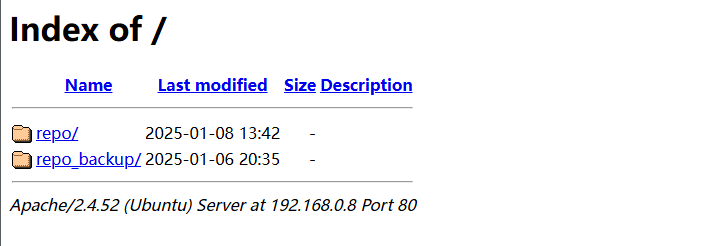
3. 本地配置与操作
添加远程仓库
在本地服务器添加远程仓库:
ostree remote add origin4 http://192.168.0.8/repo --repo=/mnt/hdd/ostree_local/repo
origin4:自定义远程仓库别名。http://192.168.0.8/repo:远程仓库 URL。--repo:本地仓库路径,需提前初始化。
查看和删除远程仓库
查看已配置的远程仓库:
ostree --repo=/mnt/hdd/ostree_local/repo remote list
删除远程仓库配置:
ostree --repo=/mnt/hdd/ostree_local/repo remote delete <REMOTE_NAME>
删除本地仓库:
rm -rf /mnt/hdd/ostree_local/repo
查看远程仓库分支
列出远程仓库的分支:
ostree remote refs origin4 --repo=/mnt/hdd/ostree_local/repo
示例输出:
origin4:V1.0
如果提示
error: Remote refs not available; server has no summary file,需要在远程服务器上生成summary文件:
ostree --repo=/mnt/hdd/ostree/repo summary -u
配置环境变量(可选)
为减少命令中 --repo 参数的使用,可以设置环境变量:
临时生效:
export OSTREE_REPO=/mnt/hdd/ostree_local/repo
永久生效:
将以下内容添加到 ~/.bashrc 或 ~/.zshrc 中:
export OSTREE_REPO=/mnt/hdd/ostree_local/repo
然后执行:
source ~/.bashrc
4. 拉取远程数据
执行拉取
从远程仓库拉取指定分支:
ostree pull origin4 V1.0 --repo=/mnt/hdd/ostree_local/repo
origin4:远程仓库名称。V1.0:远程仓库分支。
示例输出:
6540 metadata, 87468 content objects fetched; 1417313 KiB transferred in 65 seconds
深度拉取
默认情况下,pull 只拉取最新的提交。如果需要拉取完整的提交历史,可指定深度为 -1:
ostree pull origin4 V1.0 --repo=/mnt/hdd/ostree_local/repo --depth=-1
禁用 GPG 验证
如果拉取时报以下 GPG 错误:
error: Commit ...: GPG verification enabled, but no signatures found
修改本地仓库配置文件 /mnt/hdd/ostree_local/repo/config,在对应的远程仓库下添加:
[remote "origin4"]
url=http://192.168.0.8/repo
gpg-verify=false

留下评论